V MANMOHAN
Creating Mind Maps, Organisation Structure, Process Flow Charts, Story telling & Making them Interactive
using NoteBook LLM and Gemini, ChatGpt, and Claude.
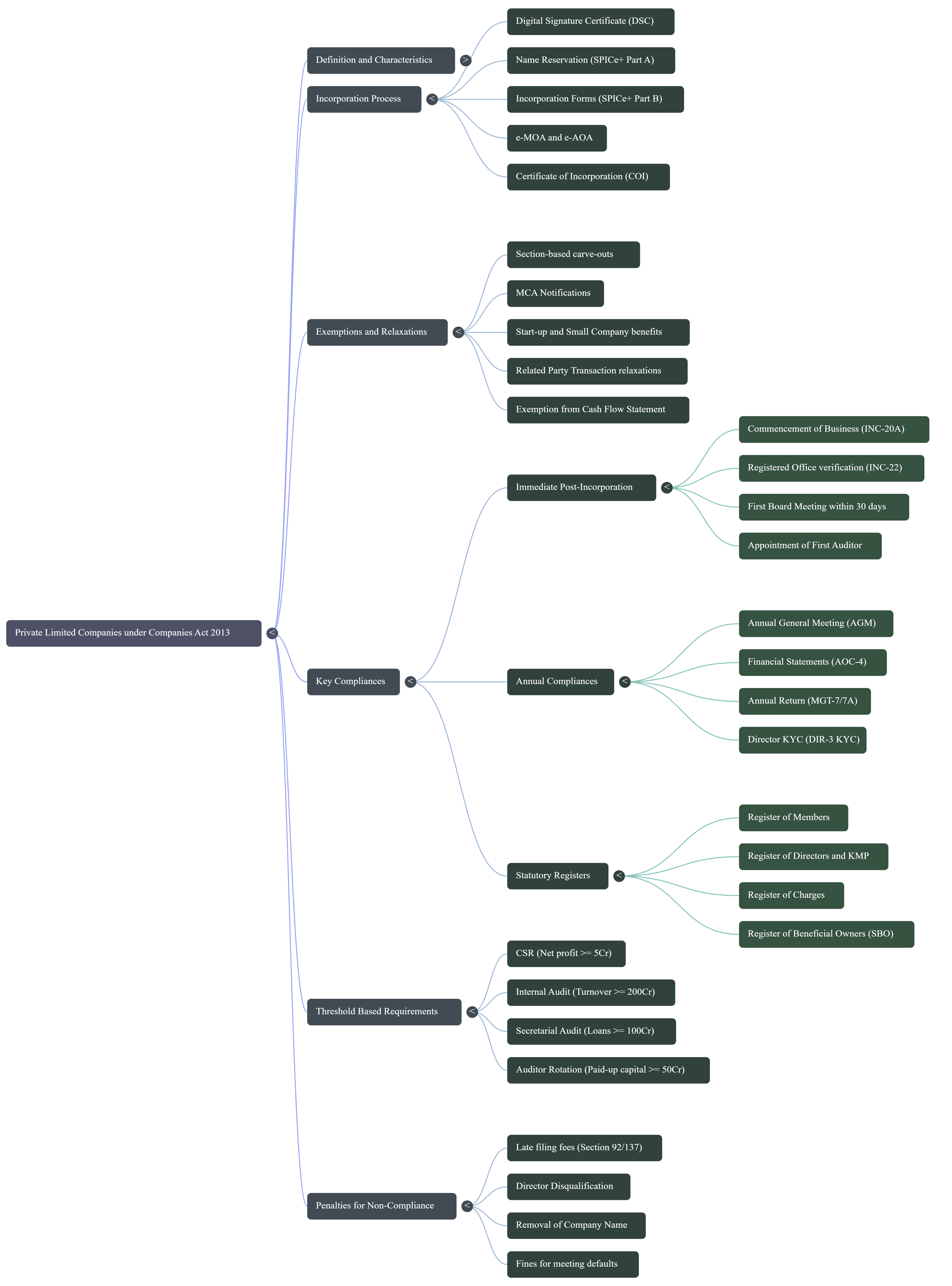
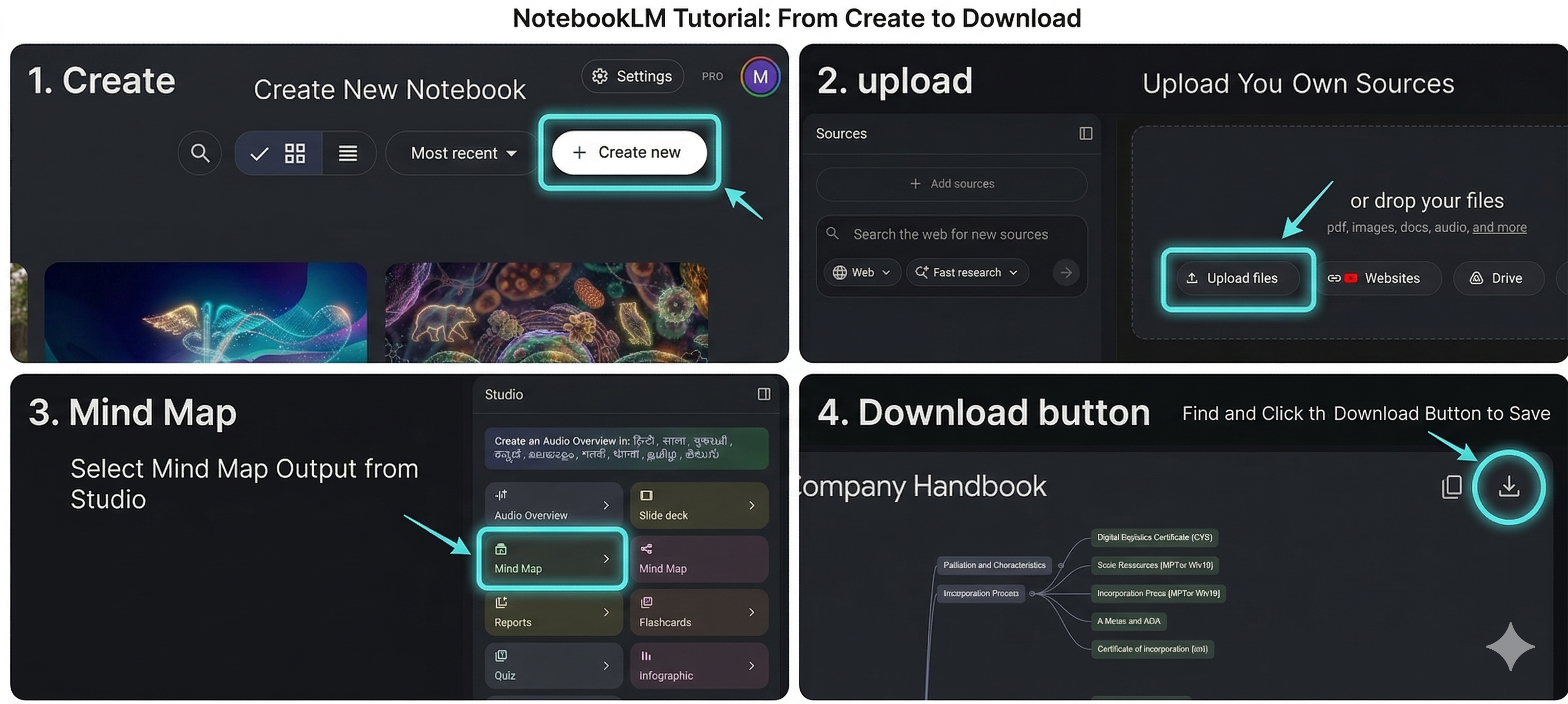
Step 1: Extracting with NotebookLM
Follow these 4 simple steps to extract structured data from your documents.
Step 2: The Master Prompt
Once you have your structured data, use this master prompt in your preferred LLM (Gemini, ChatGPT, Claude) to generate the visual code.
How to use
Copy the prompt on the right. Remove the // characters only from the specific layout, format, and theme options you want to activate for your specific project.
master-prompt.txt
Transform the attached content into a presentation-ready visual image with 4k Resolution.
Apply the core formatting rules and the active (uncommented) format, layout, theme, and styling selections below:
CORE STRUCTURE & FORMATTING (Always Active):
Text Formatting: For each node, use a two-part format: a short bold label of 2-4 words and a concise, lighter supporting line of 6-10 words maximum. Ensure clear visual hierarchy and legible alignment.
Organization: Group related ideas into distinct visual clusters or phases, limiting the number of sub-nodes to avoid clutter.
Quality: Prioritize a premium, professional design comparable to high-end consulting slides or polished UI dashboards.
1. FORMAT & ASPECT RATIO (Remove // for ONE option):
// 16:9 Widescreen: Optimize for standard modern presentations, desktop screens.
// 4:3 Standard: Optimize for traditional presentations, tablets.
// A4 Portrait: Optimize for a standard vertical document, report.
// A4 Landscape: Optimize for a horizontal printable document.
// 1:1 Square: Optimize for social media feeds.
// 9:16 Vertical: Optimize for mobile phone screens.
2. STRUCTURAL LAYOUT (Remove // for ONE option):
// Radial Layout: Place the main concept at the centre and distribute branches evenly.
// Organic Layout: Main concept at centre, extend branches in a flowing layout.
// Linear Flowchart: Directional sequence (left->right or top->bottom) using arrows.
// Hierarchical Layout: Structure top-to-bottom or bottom-to-top tiers.
// Matrix/Quadrant Layout: Divide canvas into a grid (e.g., 2x2).
// Narrative/Storytelling Layout: Arrange content along a flowing, winding path.
// UI Widget Grid Layout: Organize into a responsive-looking grid.
// UI Sidebar Layout: Core concept as left-hand sidebar navigation.
// Interactive HTML/UI Dashboard Layout: Responsive digital UI layout suitable for web.
3. COLOR PALETTE & THEME (Remove // for ONE option):
// Light & Minimal Theme: Clean white/grey background, soft colors.
// Dark & Modern Theme: Charcoal/black background, vibrant accents.
// Corporate Theme: Crisp white/pale gray background, deep blues/slate grays.
// Warm & Vintage Theme: Textured parchment background, muted classic colors.
// Cyberpunk/Sci-Fi Theme: Deep purple/black, glowing neon palettes.
4. NODE & ELEMENT STYLING (Remove // for ONE option):
// Flat Vector Styling: Solid colors, sharp edges, no shadows.
// Glassmorphism Styling: Semi-transparent frosted glass, soft drop shadows.
// Neumorphic (Soft UI) Styling: Low-contrast extruded/pressed elements.
// Hand-Drawn/Illustrated Styling: Imperfect shapes, marker fills, sketchy lines.
// Data-Driven/Metric Styling: Analytical dashboard widgets with mini-charts.
// 3D/Isometric Styling: 3D floating blocks/cylinders.
5. Additional Requirements (If any):
[Insert specific project requests here]
Step 3: Real Use Cases
Explore how the master prompt is customized for different visualisation types.
Simple Mind Map
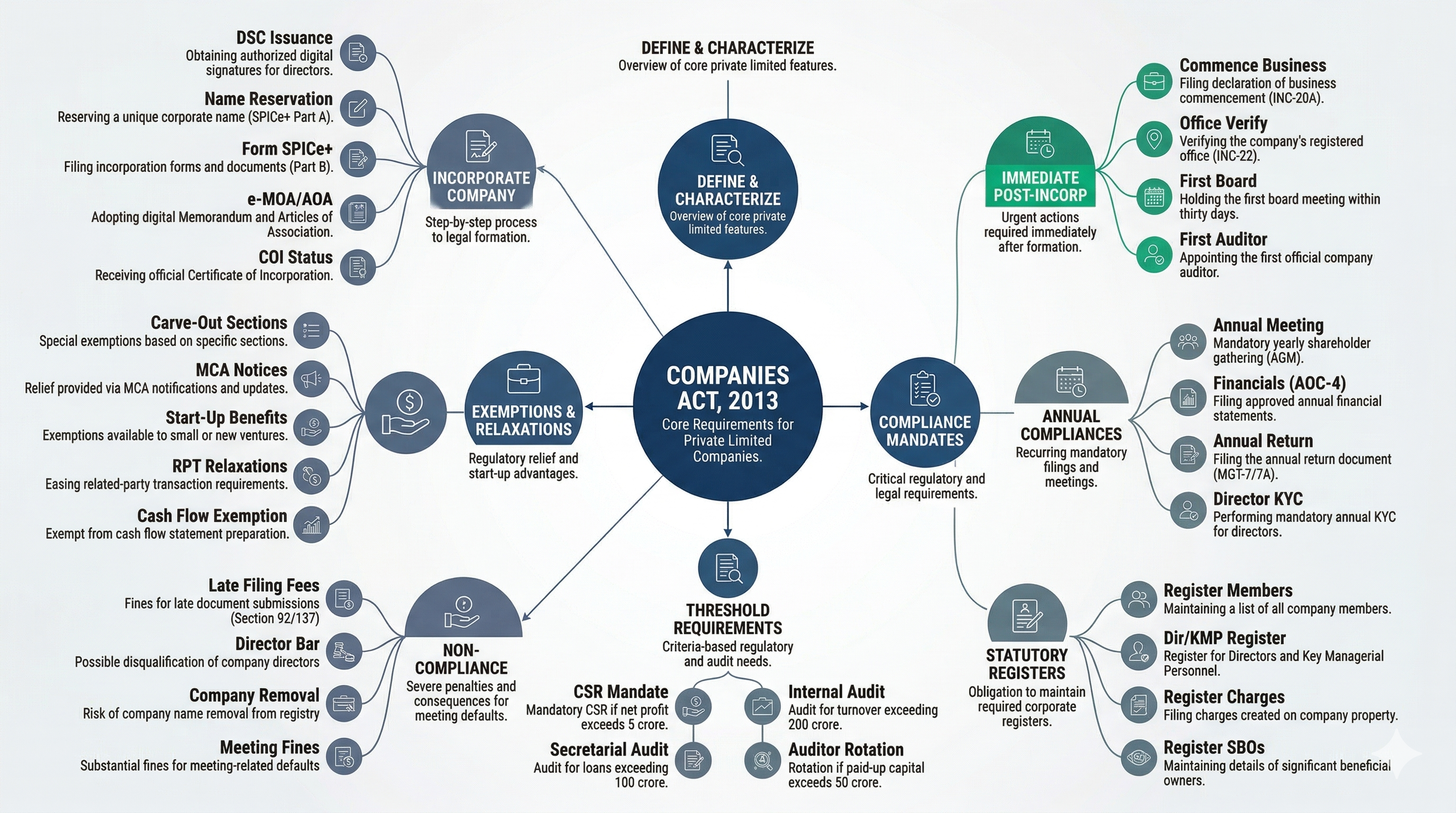
A clean, corporate mind map ideal for standard business presentations. It centralizes the core idea and distributes supporting nodes radially.
Active Selections:
- Format: 16:9 Widescreen
- Layout: Radial Layout
- Theme: Corporate Theme
- Styling: Flat Vector Styling
Applied Prompt Example
1. FORMAT & ASPECT RATIO
16:9 Widescreen: Optimize for standard modern presentations, desktop screens.

2. STRUCTURAL LAYOUT
Radial Layout: Place the main concept at the centre and distribute branches evenly.

3. COLOR PALETTE & THEME
Corporate Theme: Use a crisp white or pale gray background. Rely on a strict, professional color palette...

4. NODE & ELEMENT STYLING
Flat Vector Styling: Eliminate shadows and gradients. Use solid colored shapes...